Tampilkan postingan dengan label Internet. Tampilkan semua postingan

Software for recording activity on the computer

1. Free Screen Recorder

This program may be a program that has the smallest size (about 592 KB) and is able to record activity on the screen including audio (voice) and the resulting AVI video format standard.


Download software here


2.jing

This software is more fikus for the website (in SWF format), maybe this program is pretty good, besides we are also able to upload the results on screencast.com address that provides up to 2 GB of free space.
Only, to use this application, we must join (sign up) to screencast.com, thus requiring an internet connection. Although the size of these applications is only about 4.9 MB, but we must install Microsoft. NET Framework 3.0, which is approximately 50 MB in size (for windows XP bottom).

Download Software
here


3.TipCam


Like previous programs, TipCam able to record all screen windows or only certain areas. View this application may be slightly different from previous programs, and perhaps a little difficult at first setting in the settings.

Download Software
here


4.CamStudio


This is one of opensource software is quite popular and probably the best in its class. Is the official Web site http://camstudio.org. This software will record screen activity, including audio. Its use is also fairly easy as well as a simple interface. Generated video formats are AVI standard.

Download Software here


Preview Zip Files Online

ArchView is handy Firefox plug in that lets you preview the contents of .zip files online and easily extract individual files. Say you downloaded a huge archive file and then found out that some files are corrupted. Instead of downloading the whole archive again, you can just select the files from the archive and download. Application currently supports .zip, .iso and .rar formats.


The process of installation is usual, once installed a small icon appears on the status bar of your browser. When you click on .zip file link, ArchView will display the individual files and folders present in that .zip archive.

Features:

  • Open zip files online.
  • Open or download an individual file.
  • Supports RAR and ZIP archives and ISO CD image.
  • Supports HTTP, FTP and file protocols.
  • Free and no registration.
Check out ArchView Here
source :makeuseof.com

Opera 10.50

Download Opera Final 10:50 - Not long ago after a beta version, today officially launched the latest version of Opera tyang you can download for free, Opera 10:50. The final version is claimed to be the fastest browser Opera as they have ever had and also the fastest in the latest Opera dunia.Browser also claimed 7x quicker from his predecessor.


The following developments and features - the latest features of the latest Opera:
  • Latest JavaScript named talking about (taken from the Javanese word Hanacaraka) and Vega also graphics library that can boost the performance of this new browser so 7x faster than before.
  • Support to Private Browsing so that browsers do not save your surfing activity.
  • With integrated features - features like Aero Glass, Aero Peek and Jump Lists in Windows Vista and the latest windows windows 7.
  • Optimize support for HTML5 and CSS3.
  • New Display dialog windows and tabs.
  • Optimization of the address bar and search features. 10:50 Opera is able to store addresses have ever typed in the Address bar and shows a history.
Download Here

Internet Download Manager 5.19


Internet Download Manager has a built-in download logic accelerator that includes intelligent dynamic file segmentation and safe multi-layer technology to boot, which helps speed up downloading.

Internet Download Manager supports proxy servers, ftp and http protocols, firewalls, redirects, cookies, authorization, MP3 audio and MPEG video content processing. IDM integrates seamlessly into Microsoft Internet Explorer, Netscape, MSN Explorer, AOL, Opera, Mozilla, Mozilla Firefox, Mozilla Firebird, Avant Browser, MyIE2, and all other popular browsers to automatically handle your downloads. You can also drag and drop files, or use Internet Download Manager from command line. Internet Download Manager can dial your modem at the set time, download the files you want, then hang up or even shut down your computer when it's done.

Download this software Here

Greate Banner Online

We have reviewed many web banner making tools previously on this site. LiveBannerMaker is another addition to that list and is probably simpler and easier to use than the others. The process of banner creation is simple – click on create a banner, select the banner size (like leaderboard, square etc), add a custom background, add and modify the logo text, add or upload effects and then download or share it via social networks like Facebook and MySpace.


The LiveBannerMaker makes the entire process of creating website banners a cakewalk.


Features:
  • Easily create website banners online.
  • No sign up required to create and download banners.
  • Add custom backgrounds and effects. Also upload images to the banner.
  • Share your banner across various social networks directly from the site.
Check out LiveBannerMaker @ www.livebannermaker.com
Source :makeuseof.com

15000+ Free Downloadable Icons

Next time you need an icon for you website or design project make sure to check out Icones.pro. It offers a huge collection of free downloadable icons. There are currently more then 15,000 high quality icons available in PNG and ICO formats in several sizes.


The site is only in French, however it’s really easy to find your way around. You can search for icons using related keywords or browse by categories.


Features:
  • Lists around 15,000+ high quality icons.
  • Icons are available in different sizes and in PNG / ICO formats.
  • Search and browse icons by categories (Twitter, Rss, Apple, Facebook… etc.)
  • Completely free and no sign up.
  • Similar sites: IconFinder, Iconza and IconPot.

Check out Icones.Pro @ www.icones.pro (via Tecnopassion)

How to Edit Online Video Online


Online video has gotten massive during the last few years, partly due to the ability to embed video from one source to another.
This is a great concept for writers and anyone who wants to share videos. However, it’d be nice to be able to cut down and edit such video so you’re sharing exactly what you want to.
Particularly useful, and something I haven’t yet seen outside of video blogging, is the use of video to quote speech or reference specific information. It seems to be all or nothing at the moment.
Granted it is easier, if you were to quote somebody for instance, to just grab some text and paste it in your article. But the possibilities of integrating a form of communication so closely linked to print with the dynamism of video and everything digital are so great, it seems odd that such online editing sites haven’t blown up.
Thankfully, ExtremeTech have put 5 such sites to the test. Each review has a summarized table at it’s conclusion to make your decisions easier.

5 Free Online Video Editing Sites Reviewed – [ExtremeTech]
  1. Eyespot
  2. Cuts
  3. Jumpcut
  4. One True Media
  5. Motionbox


Easy Audio to MP3, WAV, OGG, WMA, M4A, MP4 and AAC Converter

Music is stored in a variety of formats: MP3, OGG, WAV, ACC and MP4, just to name a few. This can be annoying if you have music in one format and a digital audio player that can only play another. If you’re looking to convert audio to MP3, WAV, OGG, WMA, M4A, MP4 and AAC, but don’t want to install a dedicated program to do so, Media.io is the web tool you’ve been looking for.


Simply upload your music in one format and download it in another. The process might take a while, particularly if your Internet connection isn’t all that quick, but it works. There’s one catch, however: you can only upload 250MB of music at once. This is more than sufficient for a single album, but if you want to transcode your entire library you may want to consider a local alternative.

Features:
Check out media.io @ www.media.io
source:makeuseof

Improve Game Performance On Slower Computers Using Game Booster

Are your games running slowly in your system, the possible reason could be system requirements for the game are not met.But incase your system meets the minimum requirements and you feel that the games are still slow then you can try Game Booster which will help optimize your PC for smoother, more responsive game play by temporarily shutting down background processes, cleaning RAM, and intensifying processor performance.

Just launch the application and Click “Switch To Gaming Mode”,Game booster will show a list of applications that are running and the amount of memory consumed by each application.You can either select/deselect any application or process that you want/don’t want to stop and press next.


After doing the required steps it will show the list of stopped processes and the amount of memory freed.Now you can minimize the application to tray and start your game.After finishing the game, maximize the GameBooster application from the tray and click “Back To Normal Mode” to restart all closed applications.

Features :

One Click Game Boost

1.Speed up Game Play by assigning more CPU and RAM to your games,
2.Increase Gaming Stability – temporarily closing background processes and unnecessary 3.Windows services to avoid possible conflicts during game play.
4.Windows 7 Ready.

Compatible with Windows 7, Vista™, XP(32bit and 64bit)

Download– GameBooster

Enjoying TV Online TV-Free in Google Chrome


Google's endless provide services to the community, especially the lovers of the internet, by providing facilities to watch tv online for free. Even construed 2780 TV channels from around the country, including four Indonesian TV stations can be enjoyed for free, capital doang just need an internet connection.

Steps were pretty easy, just need browaer
Chrome. Then visit the site ww.tv-chrome.com


Then you are faced with the display site
Tv Chrome.Click Only [Get TV-Chrome]


Confirmation screen comes up about whether you will install the plug-in tv chrome. Click [Install] if yes, but when you are discouraged just click [Cancel].


No problems installing the appearance of a message that you now can enjoy TV services-Chrome.


Any directory structured look neat and simple, you're not too confused to find channel selection from the 2780 tv stations. The picture above looks Indonesia there are four TV channels that you can enjoy, namely Bali TV, Metro TV, TV One, and TRI T

Of the four Indonesian tv station, on my computer with Internet connection speed 384 kbps is the most convenient TV TRI, because rarely nge-lag compared to other TV stations. Maybe you guys on a different computer. This is indeed dependent bandwitch speed internet connection and the server.
Source:makeuseof


Easily Increase Firefox Address Bar Font Size

Let’s face it, one of the most important components in any browser is the address bar where you type the URL. If you often make mistakes because the address bar font size is too small, you’ll love this Firefox add-on. It simply increases firefox address bar font size so you can read the text easily.

It is especially good for people with weak eyesight or people who have a bad resolution on their monitor. Also if you like to browse the internet late at night, this will help you prevent your eyes from getting strained. It works with any version of Firefox 3.5 or above. The developer also promises the option to change the font
size.


Features:

*Change the font size of the address bar.
*Make URLs easy to read.
*Good for people with bad eyesight.
*Compatible with the latest version of Firefox.
*No options or configuration to deal with.

Download this Add-on from Mozila
Source:makeuseof

How to Speed up Computer Performance

How to Speed up Computer Performance To follow these steps:

1.
Download the software first Here

2
. After a file has been downloaded Open in download. Then, Install Issue.


3.Open the file, Check all on 1-Click Maintenance. And click scan for issues


4.
After the scan, Click Repair problems.


5.
After that the computer will be lighter.


How to Create a Logo Online

To create an online logo Follow these steps:

1.Open site in advance online logo maker Here

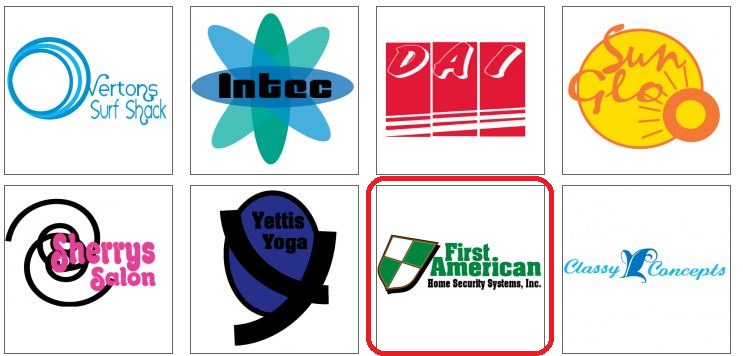
2.Click Start Designing

3.
Choose the wrong one I'll use your template example general


4.
Select one of your logo that will be created.


5.
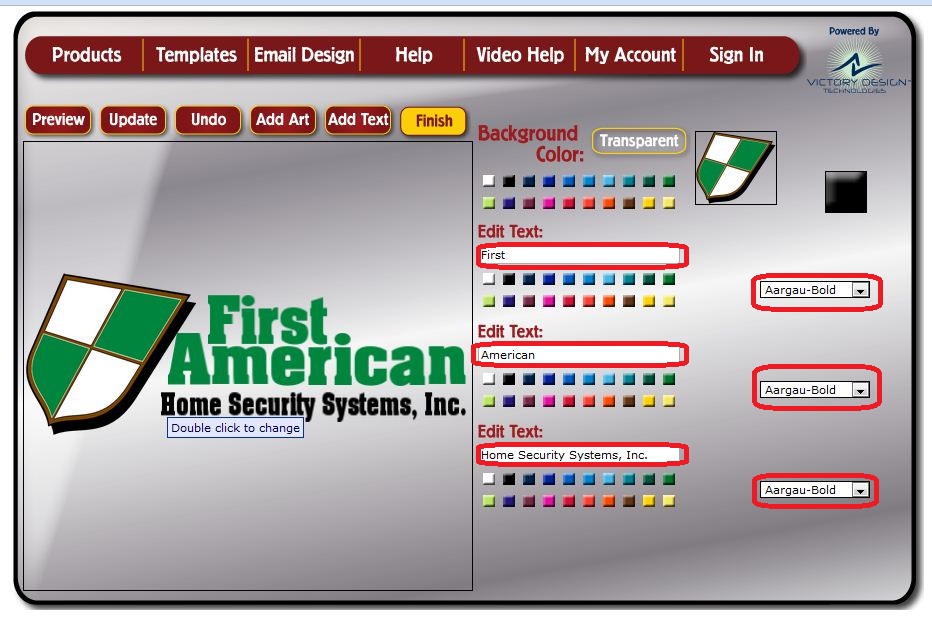
Edit the appropriate text and click Finish.

6.Click
Free Download.


7.
Already Done.

Powered by Blogger